> For the complete documentation index, see [llms.txt](https://docs.growthfactor.ai/llms.txt). Markdown versions of documentation pages are available by appending `.md` to page URLs; this page is available as [Markdown](https://docs.growthfactor.ai/changelog/readme.md).
# Changelog
New updates and improvements
{% updates format="full" %}
{% update date="2026-09-15" %}
## Two Ways to Rank a Business
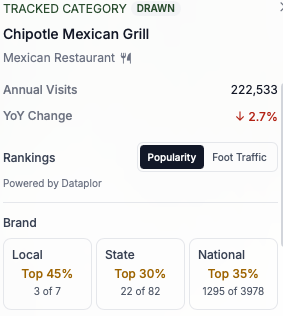
Every business popup on the map carries a **Rankings** block with a toggle for which ranking you want. Switch between **Popularity** and **Foot Traffic** and the numbers swap in place.
* **Popularity** ranks the business on its popularity score, powered by Dataplor
* **Foot Traffic** ranks it on annual visits, powered by Unacast
Each source ranks a business two ways: against its **Brand**, and against its **Category**. Both break out **Local**, **State**, and **National**. Each card shows where the business lands and how many stores it was ranked against.
Popularity reaches businesses visit data doesn't. A POI with no foot traffic match used to open on **No foot traffic data available** with nothing else to say. Those popups now lead with their popularity ranks. An independent business has no brand to rank against, so it shows a **Category** ranking only.
When only one source can rank a business, the block names that source instead of offering a toggle.
## Deals Carry Their Name on the Map
A deal pin is the same white label pill a study pin uses, with the deal's name on it and its stage colour on the border. You no longer hover to read which deal a pin is. Long names wrap to a second line. A colour dot on the pin's trailing corner names the workspace the deal belongs to, so you can tell a shared deal from your own without selecting it.
Deals cluster. Zoom out and nearby deals collect into one bubble with a count. Click it to zoom in on what's inside. A bubble can hold deals from more than one stage.
## One Forecast Card Everywhere
Studies and Site Analysis draw a forecast the same way. The forecast figure, its change against the comparison, the model picker, and the site properties sit in one card on both pages. The PDF cover follows the same layout.
A workspace with no models configured gets a message in the card instead of a heading over blank space.
{% endupdate %}
{% update date="2026-09-11" %}
## A New Home Page
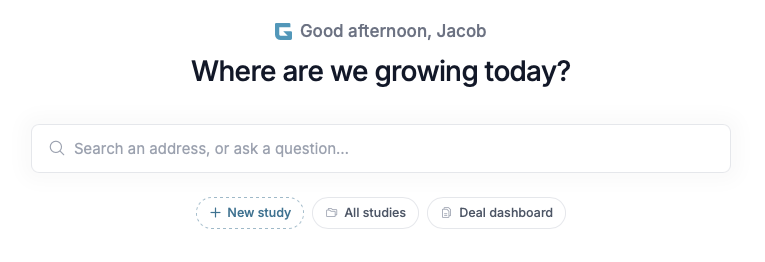
Signing in lands you on a home page that opens with one question: **Where are we growing today?**
Type an address into the search box and a new study opens with a pin dropped there and its default trade zone drawn. Type a question instead and the new study opens with the GrowthFactor Agent already working on it. The dropdown offers both, so you pick which one you meant. Press the `/` key from anywhere on the page to jump into the box.
Under the search box, **New study**, **All studies**, and **Deal dashboard** get you where you were going in one click.
**Where you left off** lists the three studies you edited most recently, and when you touched them. **Home** now sits in the sidebar, and the logo brings you back here.
## Foot Traffic for the Areas You Draw
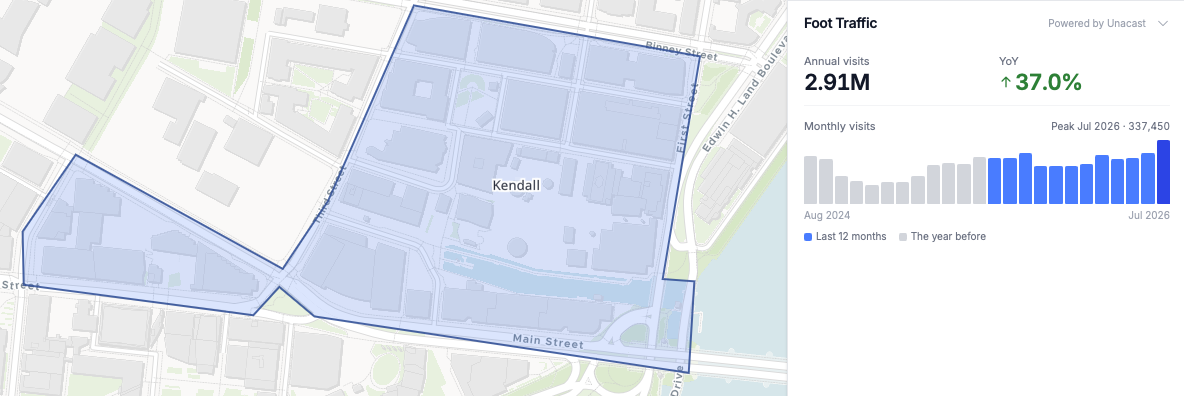
Foot traffic now works on the shapes you draw. Select a polygon you traced or a boundary you extracted, open the **Data** tab in the right panel, and the **Foot Traffic** row estimates the visits inside it.
Click **Estimate** to start. The first run takes several minutes. Keep working while it builds, then come back to the shape and the estimate is waiting.
You get **Annual visits** for the area, the **YoY** change, and a **Monthly visits** chart covering two years. The chart opens on the busiest month. **Last 12 months** and **The year before** sit side by side, so you can see which months moved. Click any column to read that month's total.
Shapes under 10,000 m² carry a note. Small areas hold little signal, so draw the building plus its parking for a steadier estimate. An area with a hole in it, or one that crosses over itself, has no single region to measure, and a message asks you to redraw it as a solid shape.
## Filter the Listings on Your Map
The **Available Listings** layer narrows to the inventory you're looking for.
In a study, open the **Layers** tab and click **Edit** on the **Available Listings** row. On Site Analysis, click **Layers**, then **Filter listings** under the layer. Both open the same **Filter listings** panel.
* **Property type** — **Retail** or **Land**
* **Transaction** — **Lease** or **Sale**
* **Status** — **Active**, **Price reduced**, **Pending**, and **Sold, leased & off market**. The last one starts off, so transacted and off-market properties stay out of the way until you ask for them
* **Available size (SF)** — a **Min** and a **Max** in square feet
The map redraws as you change anything. **Reset** returns every filter to its default. While a filter is on, the **Filter listings** button carries a dot, so you can tell the map is narrowed.
Your filters follow you. They're saved in your browser and apply to every study and to Site Analysis until you reset them.
Land is measured in acres, so setting a size range hides land listings. The panel says so under the size boxes.
Listings draw once you've zoomed in to roughly city level, and every pin is a single listing now.
## A Search Bar That's Always There
The study map toolbar carries a search field you can see. It sits at the left of the toolbar, reading **Search**. Click it or press the `S` key to expand it, and `ESC` closes it. Dropping a pin by hand has its own toolbar button, **Drop a pin** (shortcut `D`).
Search an address or a place name. Picking a result flies the map there and drops a pin.
#### Search for Places, Not Just Addresses
Type a business or a landmark by name and it comes back as a suggestion. Pick one and the pin takes the place's name, so a pin on Fenway Park is called **Fenway Park** rather than its street address. Site Analysis takes place names too, and leads its results card with the name.
An empty search box opens your **Recent Searches**, up to nine of them, each removable.
#### Drop a Pin and Its Trade Zone Together
The search bar carries a checkbox naming your workspace's default trade zone, like **Add 1 mile radius**. Tick it and every pin you search for arrives with that zone already drawn. It stays ticked until you untick it.
The **Add trade zone** popover leads with the same default. One click draws it, and **Edit default** changes what it is.
## Improvements and Bug Fixes
* **Renaming a deal renames its trade zones** — zones drawn on a deal or a store relabel to match the new name, and a zone you named yourself keeps your name. Zones drawn before this keep the name they have
* **The agent promotes a pin to a deal** — ask it to turn a study pin into a deal and the pin itself becomes the deal, keeping its trade zones, analyses, name, and comments. It used to create a second location at the same spot and leave the pin behind
{% endupdate %}
{% update date="2026-09-10" %}
## A New Basic Map Style
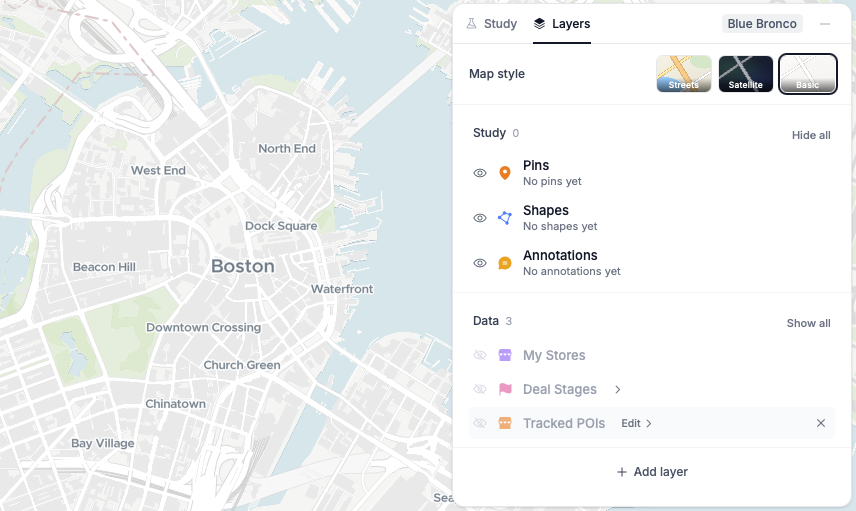
**Basic** joins **Streets** and **Satellite** in the map style options. It's a muted base map, so pins, shapes, and data layers stand out against it. Pick it from the map style button on any map, or from **Map style** in a study's **Layers** tab.
{% endupdate %}
{% update date="2026-09-08" %}
## Choose the Demographics Your Workspace Uses
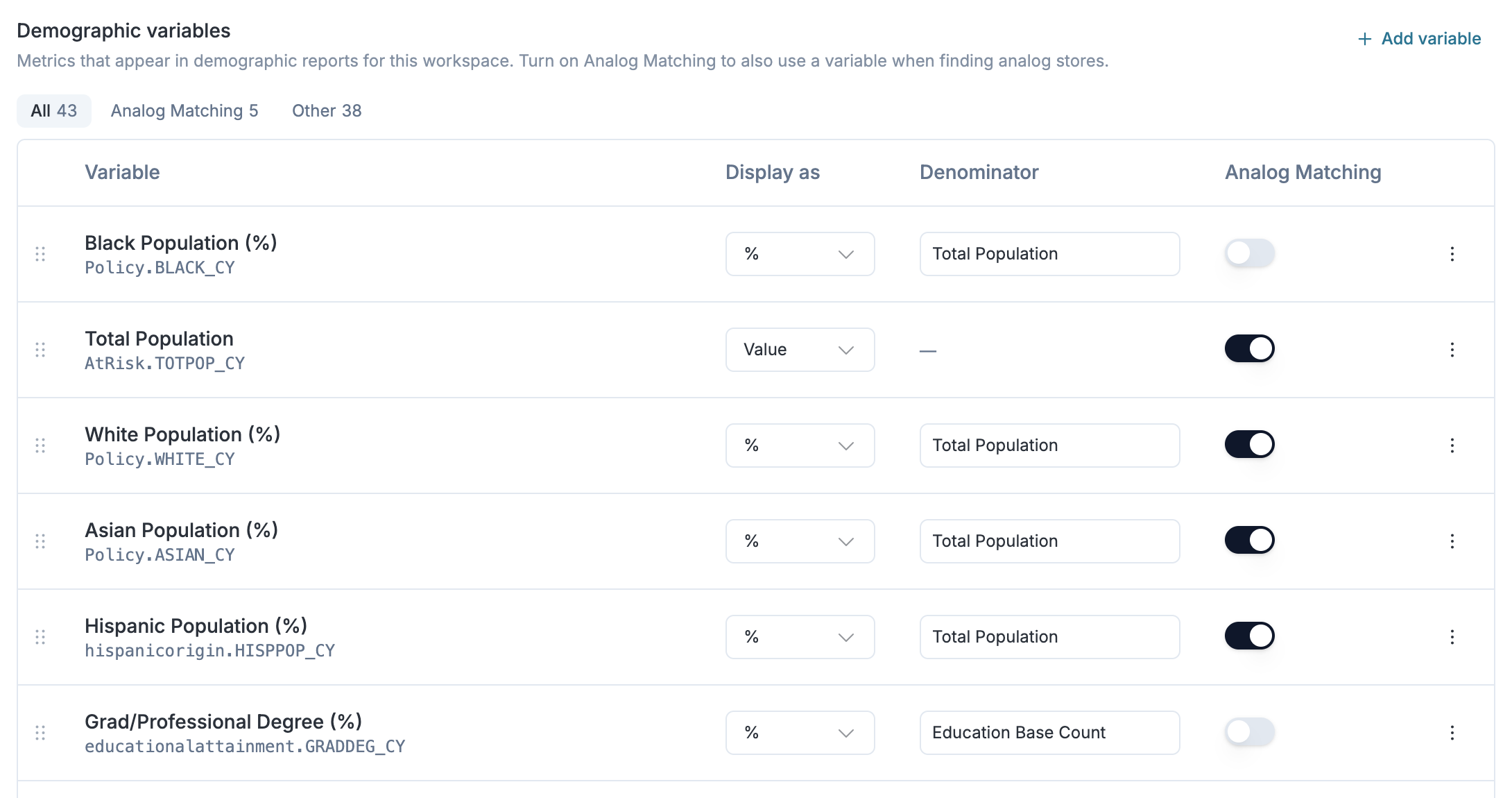
Workspace admins can now pick which demographic metrics the platform reports on. Open **Workspace Settings → Demographic variables**, add the variables you want, and set how each one displays. This can be a raw count, or a percentage of a denominator you choose. Drag variables to reorder.
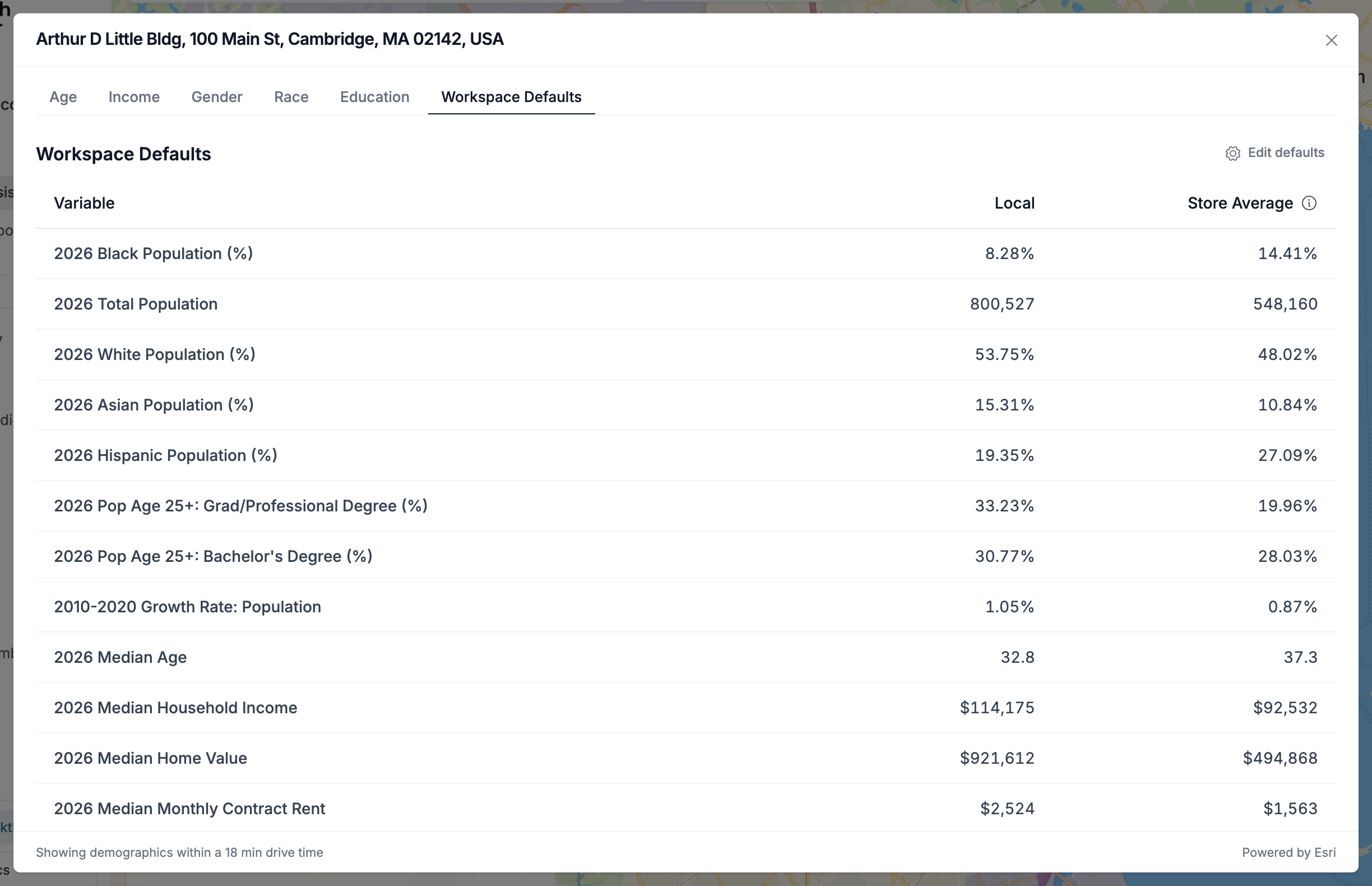
Your list drives demographics everywhere. The demographics modal keeps its usual age, income, gender, race, and education breakdowns, and adds a **Workspace Defaults** tab showing your variables in the order you listed them. Change the list in settings and an open modal repopulates, with an indicator while the new numbers load.
Turn on **Analog Matching** for a variable and it also becomes one of the metrics used to find analog stores, so the comparables you match on and the demographics you report on are one list.
#### Exports Carry Them Too
PDF and Excel exports include your **Workspace Defaults** variables, for both demographics and analogs.
#### Presets Are Retired
Demographic presets have been replaced by your own configured list, and the preset switcher no longer appears in Workspace Settings.
## Analogs Run on Their Own
Analogs is now its own operation in a Study rather than a section nested inside a forecast. It runs automatically for every pin and deal using your workspace's default trade zone, so comparable stores are there without opening the forecast first, and a location can be weighed on its analogs alone.
Study exports always include analogs when the operation succeeded.
## Improvements and Bug Fixes
* **Tracked businesses survive a brand rename** — tracked brands and categories now survive a brand rename, and two sub-brands sharing a name are distinguished
* **Studies show which workspace they're in** — a study's right panel carries a workspace badge, and the **Study** tab returns you to the study overview
* **The deal dashboard reflects your changes right away** — changing a deal's stage from its details page, or its workspace from the move resources page, now shows on the dashboard without a refresh
{% endupdate %}
{% update date="2026-08-20" %}
## Hourly Vehicle Traffic Across the Product
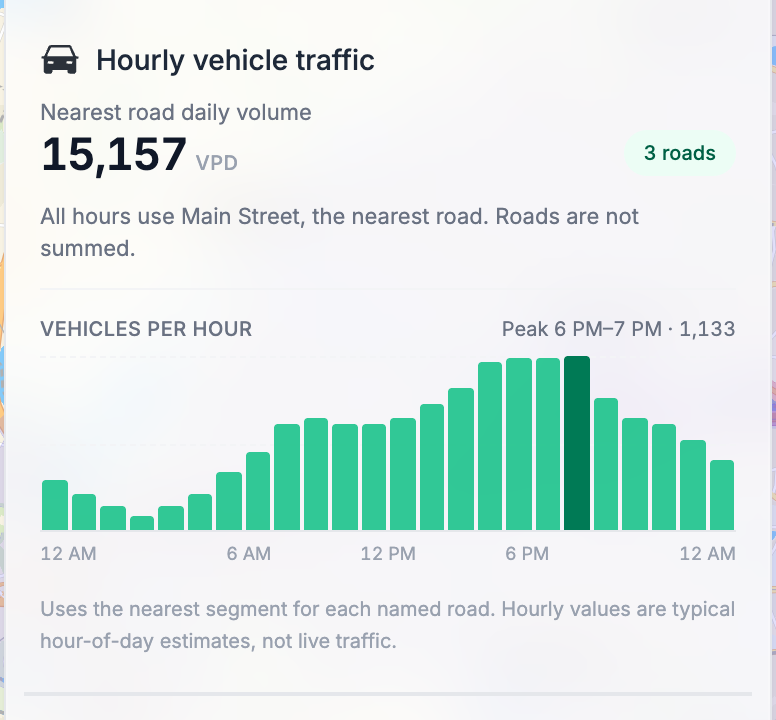
Hourly vehicle traffic now appears everywhere you work with a location, not just the **Vehicle Traffic** hover popup.
Click a pin in a study or search an address in Site Analysis and the traffic panel breaks the day into 24 hours, with the peak hour called out. The same breakdown carries into PDF and Excel exports for both studies and site analysis.
#### Ask the Agent About Hours
The GrowthFactor Agent reads hourly traffic too. Ask which hours are busiest on a road segment, or how two candidates compare at the times of day that matter to you, and it answers from the hourly numbers rather than the daily total.
## Territories Are Retired
Files you upload show as a standard map layer, and all uploads open in the same layer view.
The Territories layer group and its legend entry no longer appear, and the share dialog no longer offers Limit to territory boundary.
## The Agent Warns You Before You Run Out of Room
Long agent conversations have a context limit. As you approach it, a message appears in the chat while there's still room to act. If you are approaching the context limit, consider starting a new chat.
## Improvements and Bug Fixes
* **Agent approvals stay reachable** — a batch of approval cards no longer grows past the top of the chat panel where the **Approve** buttons couldn't be clicked. The list scrolls, and **Approve all** and **Cancel all** appear when more than one action is waiting
* **Cannibalization names deals in its footer** — the note explaining which locations take part now lists deals alongside pins and stores, matching what the comparison actually includes
* **Scoring sites over MCP bug fixes** — scoring a site through MCP returned **This feature isn't enabled for your organization** for organizations that do have it enabled
* **Site listing popups stay on screen** — a listing popup near the edge of the map no longer opens partly outside the viewport
* **Competition Analysis sees your tracked competitors** — a competitor listed in a deal's **Tracked Businesses** panel could be missed by the Competition Analysis lens, which then scored the site as having no competition nearby. Both read the same brands now
* **Study PDF exports explain their failures** — a study with a large number of pins could fail to export with no explanation. The render window is longer, and a failure now tells you to export fewer pins
* **Re-uploading a site CSV updates instead of duplicating** — sending the same file again matches each row to the site it already created and updates it. The upload preview shows which rows will be created and which will be updated before you commit
* **Foot traffic points of interest render cleanly** — enabling foot traffic points of interest with tracked businesses off no longer shows "?" markers for untracked locations
{% endupdate %}
{% update date="2026-08-12" %}
## Vehicle Traffic by Hour
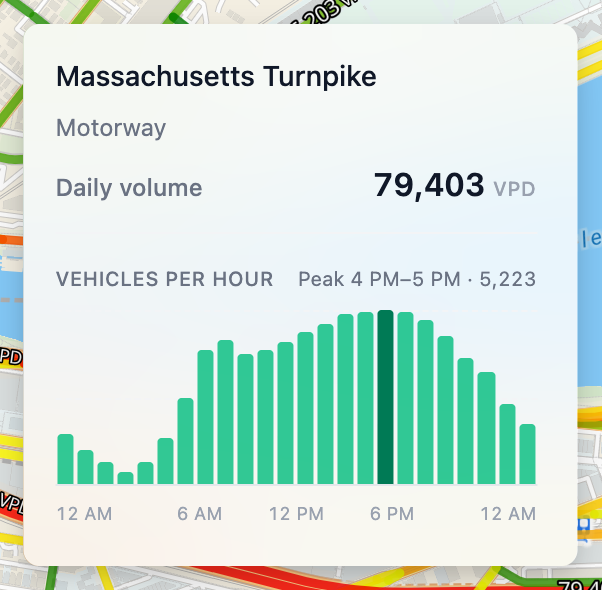
Hover a road segment on the **Vehicle Traffic** layer and the popup now breaks the day into 24 hours. You get the daily volume, a bar for each hour, and the peak hour called out beneath the chart.
Segments without hourly coverage say so instead of showing an empty chart.
## The Agent Asks Before It Acts
The GrowthFactor Agent now stops for your approval before it creates, changes, or deletes anything. An approval card appears in the chat above the composer, naming the action and the details it's about to use. Choose **Approve** to let it run, or **Cancel** to stop it.
Approval is required for creating and updating sites and deals, and for deleting pins, shapes, and annotations in a study. Everything else runs as before.
When the agent lines up several of these at once, each one gets its own card. The run picks up again once you've decided on all of them.
## Bulk Upload to the Deal Dropbox
Your Deal Dropbox link can now take several deals at once. Anyone submitting through it can select up to 50 files on the **Photo or File** step.
A single file works the way it always has. Two or more open a review grid with a row per file, and the address, square footage, price, and date already pulled from each one. Every field stays editable, and each row shows whether it's ready or still needs an address. Rows can be dropped before anything is submitted. Submitter name, email, and phone are entered once and cover the whole batch.
## Improvements and Bug Fixes
* **Show all and hide all layers** — each section of the study **Layers** tab has a toggle in its header that flips every layer in that section at once
* **Demographics corrected on multi-part areas** — population counts were doubling and education percentages could exceed 100%. Medians on cities made up of many separate pieces came back far too high, in one case reporting a median age of 123.2. Areas too fragmented to enrich now read **Demographics aren't available for this trade zone** instead of showing zeros
* **Foot traffic trade zones name the actual problem** — an address with no visitor coverage now reads **No foot traffic data for this location** and points you to a ring or drive-time zone instead. A real failure keeps the **Couldn't draw trade zone** message, so retrying is only suggested when it might help
{% endupdate %}
{% update date="2026-08-05" %}
## Cannibalization Across Your Whole Study
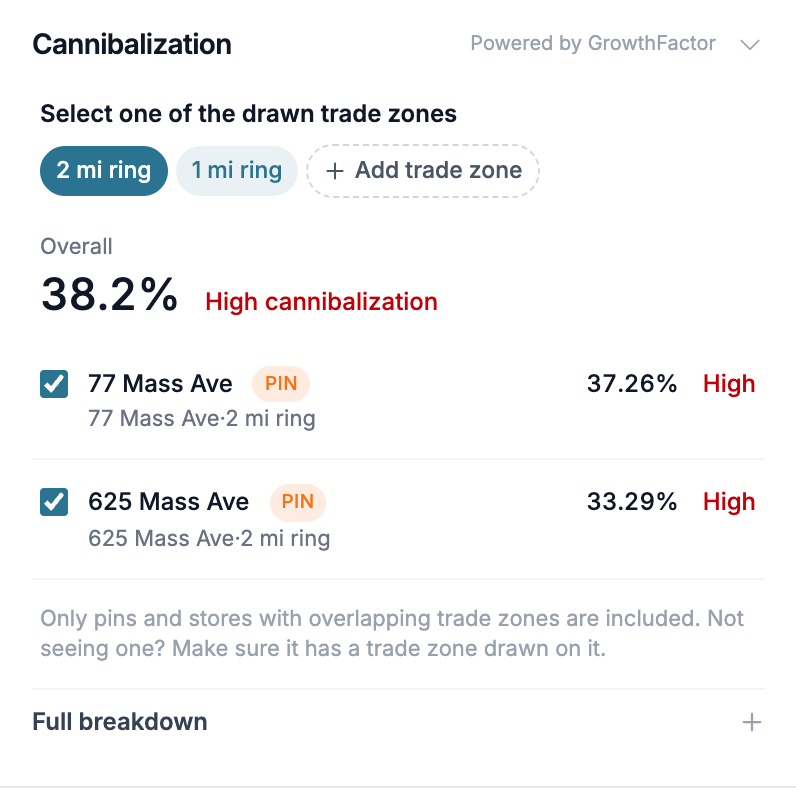
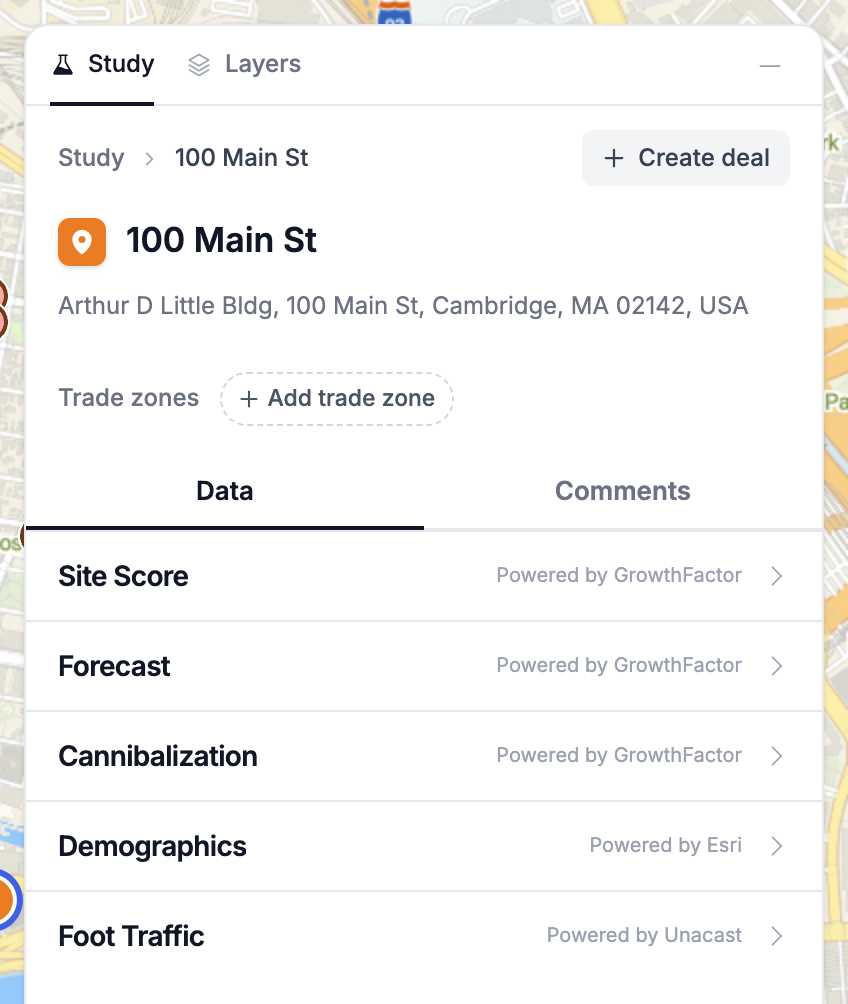
Cannibalization in a Market Planning study now works between any two locations on the map. Compare a pin against another pin, against your existing stores, and against your deals. Open a pin, store, or deal in the study panel and select the **Cannibalization** operation.
Each trade zone drawn on the location you're analyzing gets its own tab. Pick one and you get a combined overlap percentage for that zone, then a row for every pin, store, and deal it overlaps. Each row carries its own percentage and a **Low / Mid / High** badge. Uncheck a row to leave that location out, and the overlap recomputes without it.
Only locations with a trade zone drawn on them take part. If a pin you expected is missing from the list, draw a trade zone on it.
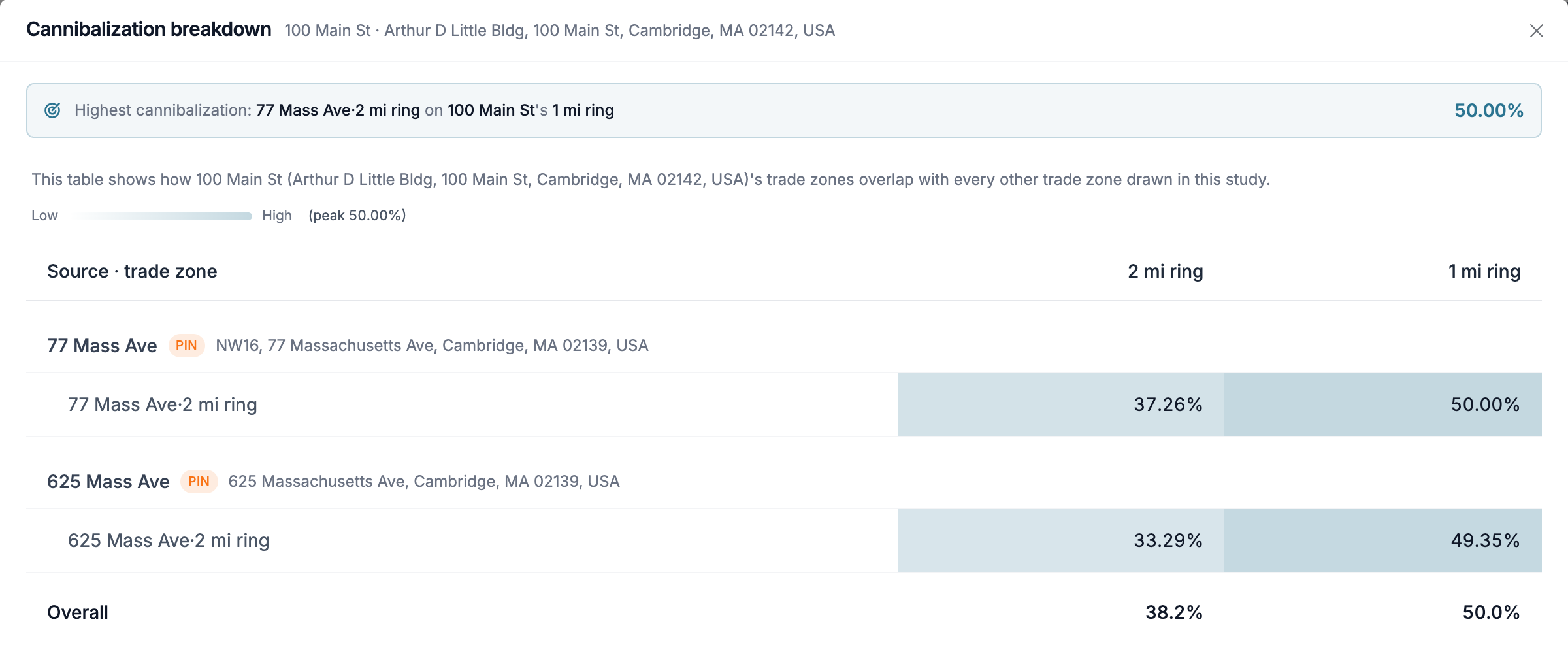
**Full breakdown** opens the complete picture: every source trade zone scored against each of your target's zones, with the highest overlap called out at the top.
#### Deals Are Part of the Comparison
Deals in the study are now compared alongside pins and stores. A deal's trade zones count as its footprint, so a candidate weighed against a deal already in your pipeline shows that overlap directly.
#### Ask the Agent
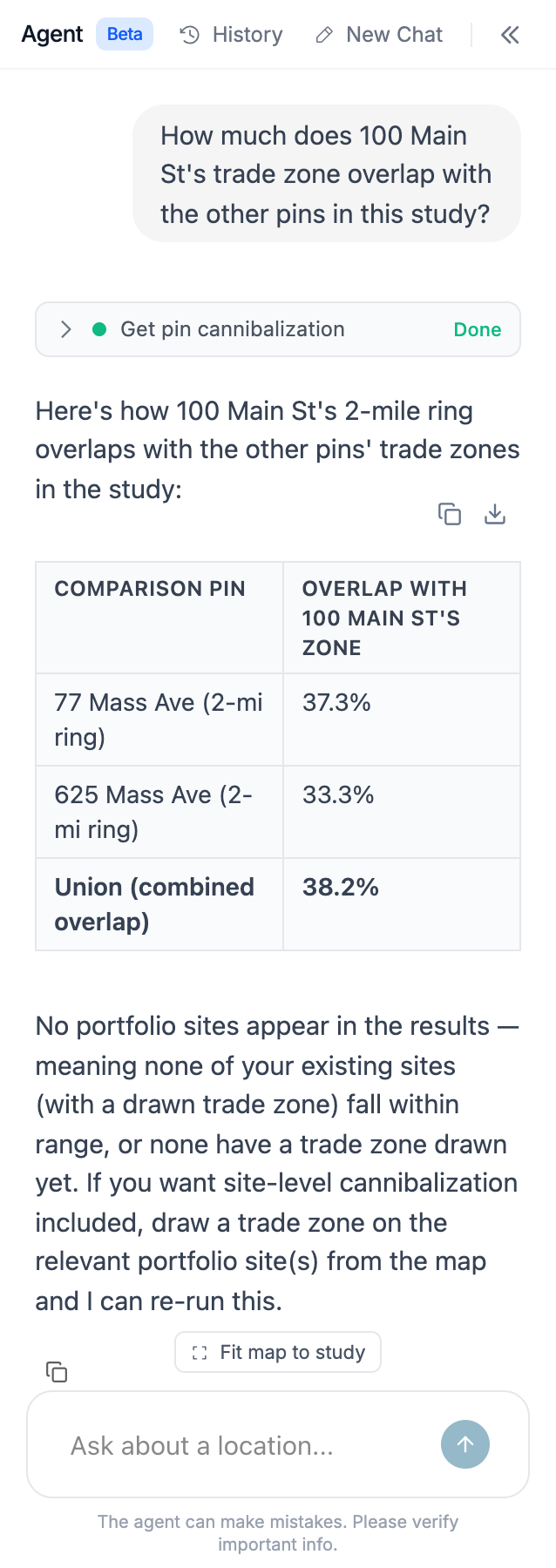
The GrowthFactor Agent runs the same comparison. Ask how much a pin overlaps the other pins in your study and it reports each overlap along with a union total. Name specific pins or drawn areas to narrow the comparison, or ask it to leave your portfolio stores out. When a pin has no trade zone, the agent says so and offers to draw one before running the numbers.
Study PDF and Excel exports carry the same results.
## Turn a Pin Into a Deal
**Create deal** on a study pin now carries the pin's work over with it. The deal takes the pin's name, and the trade zones drawn on the pin move to the deal so they stay attached. The pin restyles to your first deal stage's color and picks up a deal icon. It then appears in the **Deals & Stores** section of the study overview, with the same deal details and operations any other deal pin has. Pins that have become deals are no longer draggable, so the deal's location stays put.
## Improvements and Bug Fixes
* **Radius label out of the way while drawing** — the radius readout on a circle now sits opposite your cursor instead of following it, so it no longer swallows the click that sets the size
* **Education percentages match everywhere** — education breakdowns in the demographic chart and detail modal now use the same base population as the preset list and the agent, so the percentages agree
* The study panel shows a loading indicator while a deal loads, instead of briefly reading "Deleted deal"
{% endupdate %}
{% update date="2026-07-29" %}
## Market Planning
**Market Planning is entering general access!** Market Planning expands your horizons, letting you analyze entire markets and plans in addition to specific sites.
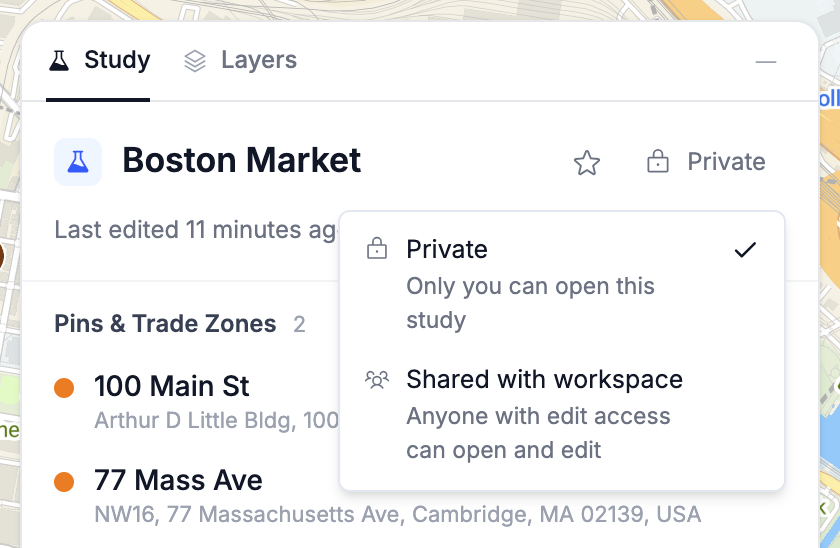
Market Planning work is done in **studies**, so you can save your work and share it with your team. A study is one map in one workspace holding everything you've put on it — the candidates you're weighing, the areas you've drawn, and the analysis you've run against them. It stays private until you share it with your workspace, and it's all saved as you go.
#### Pins, Shapes, and Trade Zones on One Map
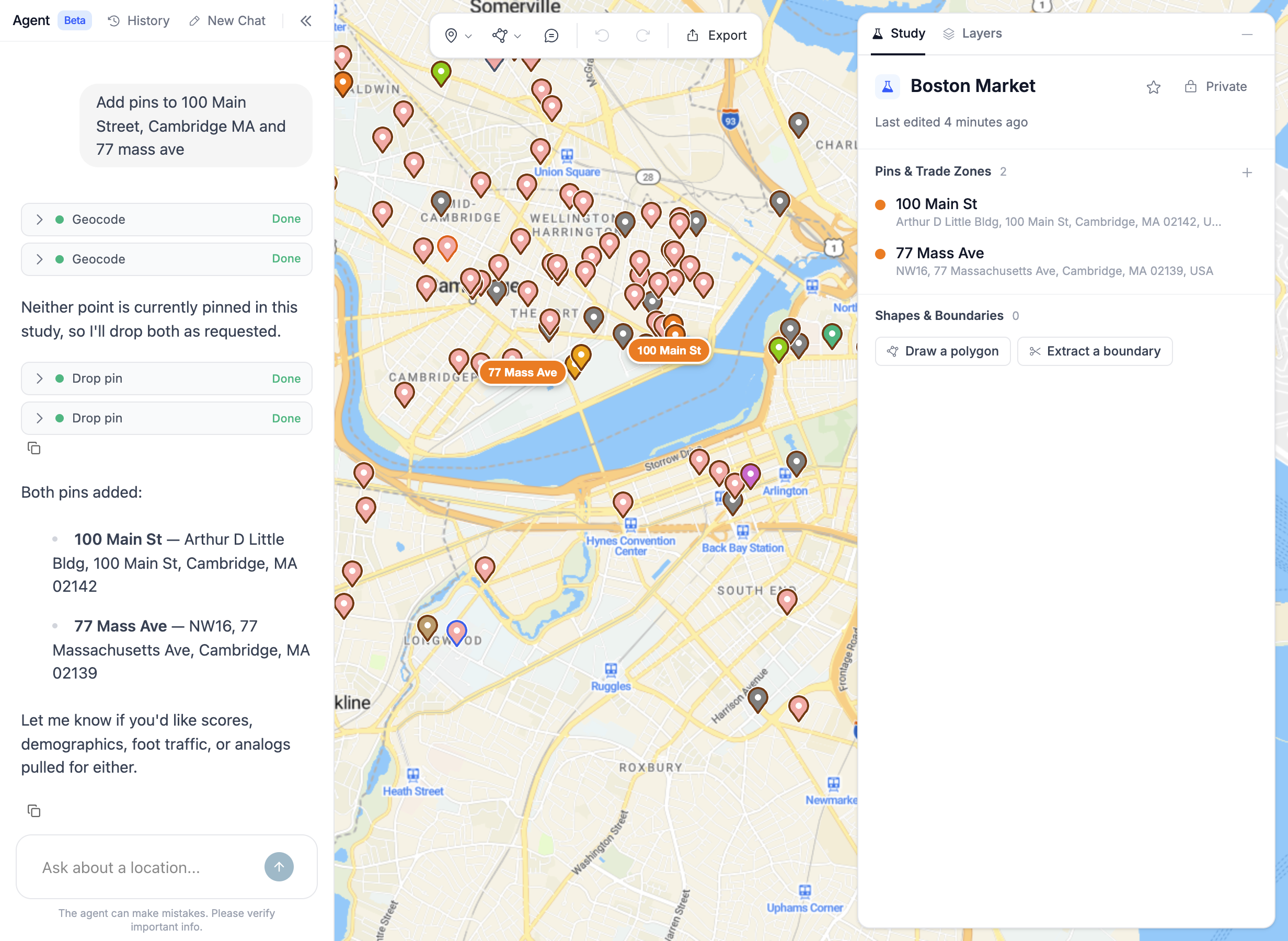
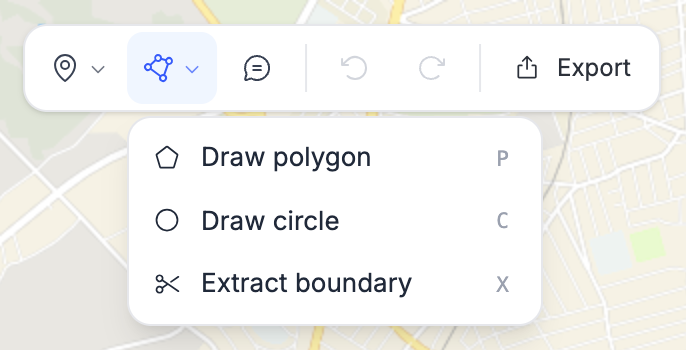
Drop pins for the locations you care about, draw or extract the areas around them, and generate trade zones as rings, drive and walk times, or foot-traffic catchments. Your existing stores and deals are already on the map, so a new candidate can be compared against your footprint the moment you place it. Shapes can be combined with union, intersect, and difference when the area you want doesn't match a boundary anyone has drawn.
#### Analysis Wherever You're Working
Every pin and zone carries the analysis you'd expect: demographics, GrowthFactor Score, sales projections, foot traffic, and cannibalization against everything else in the study. Weigh one address on its own, or lay out a dozen candidates across a market and compare them side by side.
#### The Agent Works in Your Study
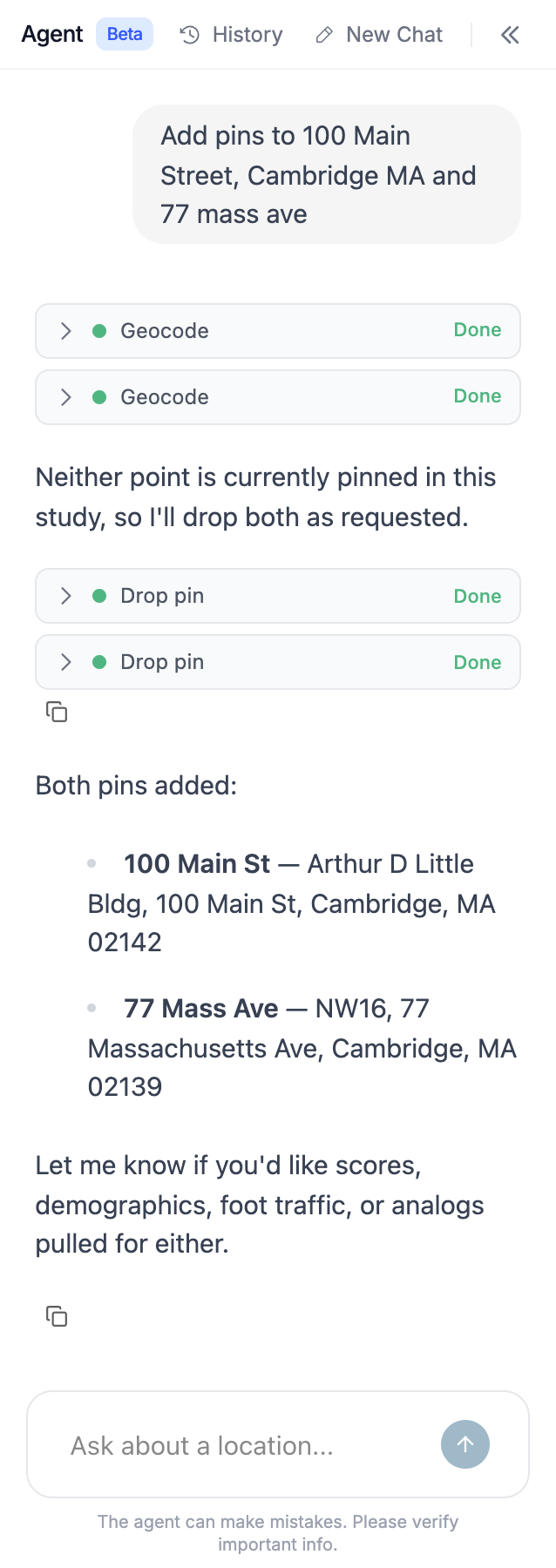
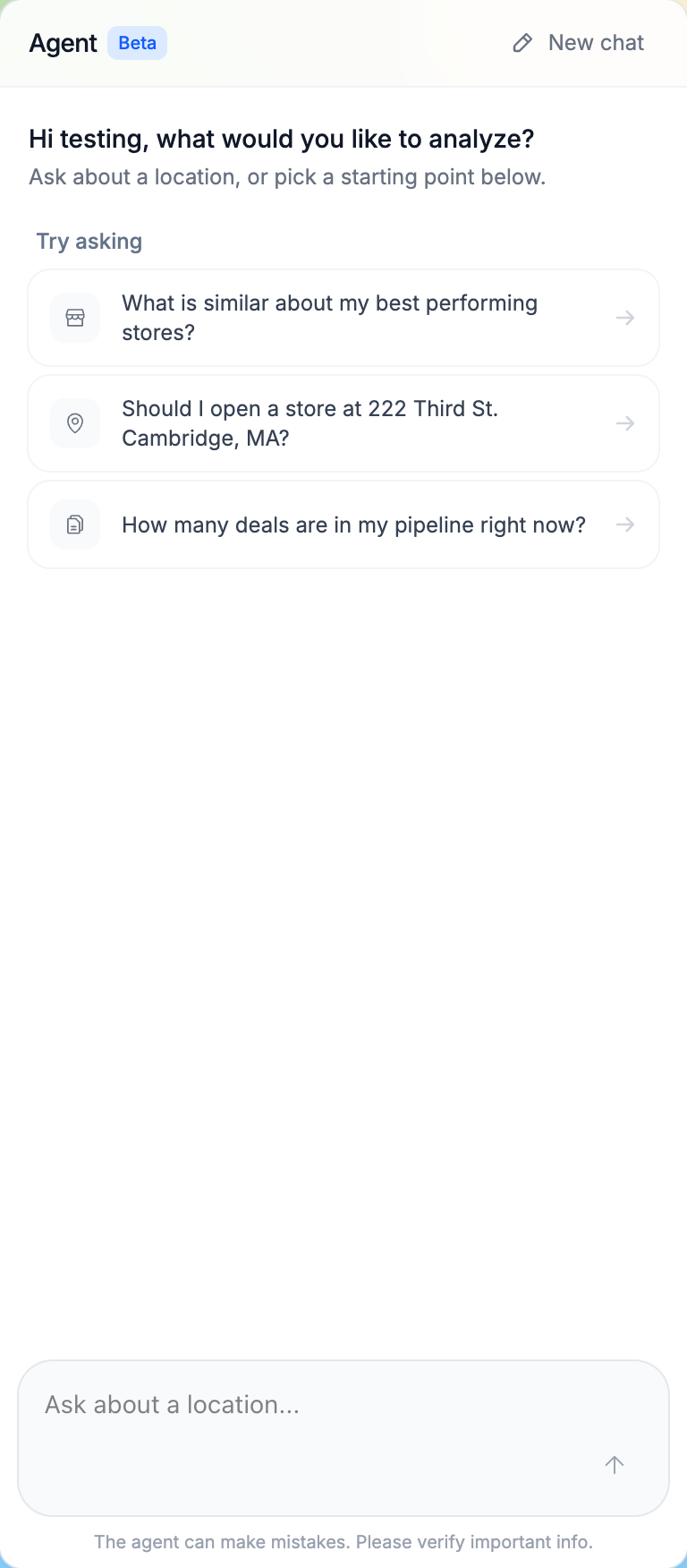
The GrowthFactor Agent sits beside the map and acts on the study directly. Ask it to drop a pin, draw a trade zone, pull demographics, run cannibalization, or leave a note, and the change lands on the map for you and your teammates to see.
#### Built for Teams
Share a study with your workspace as an editor or view-only, leave annotations anywhere on the map, and comment on individual pins and shapes. Studies can be starred, searched, sorted, and archived, and any study exports to PDF or Excel — with the agent transcript and annotations along for the ride.
{% endupdate %}
{% update date="2026-07-10" %}
## Automatic Study Naming
New Market Planning studies start out as "Untitled study" — now they name themselves. As soon as you ask the GrowthFactor Agent a question or drop your first pin or boundary, the study is automatically retitled to reflect what you're exploring (e.g. "Tampa retail expansion"). Any existing study still called "Untitled study" gets the same treatment the next time you work in it. Studies you've already renamed yourself are never touched.
{% endupdate %}
{% update date="2026-07-08" %}
## Deal Analysis
Regenerating an analysis from the deal dashboard now respects your workspace's configured default analysis settings, such as a custom ring radius, instead of reverting to the platform defaults.
## PDF Report
The Print Report PDF now gives more context on the map pages, including the number of tracked businesses and the population a polygon encompasses, so it's clearer what you're looking at. A table of contents has been added to the first page, and the GrowthFactor Score is consolidated onto a single page.
## Agent
The agent's Pedestrian & Vehicle Traffic table now reports each road segment's real distance from the site in miles — matching the rest of the report — instead of showing the segment's own length in meters.
## Improvements and Bug Fixes
* Chat suggestion text now matches the font size of the rest of the sidebar
* Removed the "Give $500, Get $500" referral prompt
{% endupdate %}
{% update date="2026-07-01" %}
## Context Menu for Pins and Trade Zones
Right-clicking (or long-pressing on touch) a pin or trade zone on the study map now opens a context menu with actions.
**Pin context menu**
* **Draw trade zone** — open the trade zone builder pre-targeted at this pin
* **Create deal** — create a deal seeded with the pin's data (hidden if a deal is already linked)
* **Add comment** — jump straight to the Comments tab for this pin in the side panel
* **Rename** — enter inline edit mode for the pin's name
* **Delete** — remove the pin
**Trade zone context menu**
* **Edit trade zone** — enter vertex-edit mode (available for custom-drawn zones only)
* **Add comment** — jump straight to the Comments tab for this trade zone
* **Rename** — enter inline edit mode for the trade zone's name
* **Delete** — remove the trade zone
## Deals from Pins
Pins and the deals created from them are now connected. A pin linked to a deal shows a **file icon** so you can tell at a glance which pins have become deals, and a **View deal** link takes you straight to that deal's page. Each pin maps to a single deal. Creating a deal from a pin that already has one is no longer possible, so you won't end up with duplicate deals for the same location. The deal's activity log records where it came from: *"Created deal from pin \[pin name] in \[study name]"* so every deal traces back to the study and pin that started it.
## Demographics
The study demographics panel is richer and more precise:
* **Counts and percentages together** — demographic breakdowns again show both the absolute number and the percentage, and clicking a metric reopens the full detail modal (including education)
* **Exact values** — unrounded figures are now available directly in the panel, not just through the agent
* **Sharper population figures** — population is shown to three significant figures, so nearby values like 1.66k and 1.74k are distinguishable instead of both rounding to 1.7k
* **Consistent variable order** — the order you set for preset variables now carries through to the analog demographics table, including income buckets
* **Presets tab** — the Presets tab appears only when your workspace has preset variables configured and data is available, instead of showing an empty tab
## Improvements and Fixes
* **Draw a trade zone around any address** — ask the GrowthFactor Agent for a trade zone around a raw address and it geocodes the location, drops a pin if one doesn't already exist, and draws the zone. This may have caused issues in previous versions, but is now functioning properly.
* **Drafting outreach emails** — the agent can now draft leasing and broker outreach emails on request instead of declining
{% endupdate %}
{% update date="2026-06-24" %}
## Agent
The GrowthFactor Agent now knows about **vehicle traffic**. Ask it for traffic counts along a corridor or near a candidate site and it pulls the data directly in conversation.
## Improvements and Bug Fixes
* The members list now sorts alphabetically by name, with name shown as the leftmost column
* Content Security Policy — the app now ships a Content Security Policy that the browser enforces, restricting which scripts, styles, and resources are allowed to load. This helps protect the application from potential attacks.
* Outlier stores are now excluded from comparables even when selected through the model card, improving forecast and cannibalization accuracy by keeping stores with missing data out of the results
* Boolean model inputs now render their default values correctly
* Adjusted the ordering and formatting of Esri demographic variables
{% endupdate %}
{% update date="2026-06-18" %}
## Model Inputs
Setting up a forecast is now faster and less cluttered. Models can be configured with default values for their input fields, so each new forecast opens pre-filled with sensible inputs instead of a blank panel — handy when a team consistently models with the same assumptions. Once your inputs are set, you can collapse the model inputs entirely to keep the focus on results.
## Agent Improvements
The GrowthFactor Agent now remembers your conversations. Every chat is saved to History, so you can step away and pick up right where you left off, with the full thread loaded back exactly as you left it. Transcripts are clean and accurate, showing the conversation as it actually happened. The agent has also become a little more careful: when you ask it to submit a feature request, it now confirms with you before sending rather than filing it automatically.
## Improvements and Bug Fixes
**Consolidated filter menu** — workspace filtering and the other page filters now live together in a single menu, making it easier to narrow what's shown
{% endupdate %}
{% update date="2026-06-03" %}
## Redesigned PDF Export
The **Print Report** PDF has been reorganized for readability:
* **New cover page** — a larger map with an expanded legend (including the cannibalized area), alongside the GrowthFactor Score badge, the sales forecast with a visual confidence range, and a demographic snapshot. Your workspace logo appears when configured
* **Lens detail pages** — each GrowthFactor Score lens gets its own page with its score, grade, and the full reasoning behind it
* **Clearer export options** — each selected option becomes a separate page (PDF) or sheet (Excel), with Sales Forecast and Visitation listed first
## Multi-Select Model Inputs
Sales forecast model features can now accept multiple values. Multi-select features are marked **(multiple)** and display their options as clickable pills — toggle every option that applies to the site and the forecast updates accordingly.
## Improvements and Bug Fixes
* **Book a walkthrough** — a new link at the bottom of the sidebar opens a booking page where you can schedule time with our team for platform questions
* Re-inviting a deactivated member now automatically reactivates their account with prior workspace roles restored — no support request needed
* Fixed sharing maps via email; the share dialog now explains how to add multiple recipients, and the Share button works as soon as a valid email is entered
* Sites created from coordinates (CSV upload or MCP) now have their address split into proper street, city, state, and ZIP fields instead of one combined address line
* The Sales Forecast card now notes that the forecast is based on cannibalized sales
* Visibility is no longer included in the default GrowthFactor Score lens set for new organizations (existing configurations are unchanged)
* The Trade Area and Cannibalization map layers are now display-only and no longer show popups when clicked
* Removed the unused Custom Maps page
{% endupdate %}
{% update date="2026-05-12" %}
## Improvements and Bug Fixes
**Market Selection Workflow in the Agent**
Ask the GrowthFactor Agent about a region (city or state) and it now responds with a rough market estimate built from demographics and site scores for the core nearby municipalities, plus a pointer to the full market selection product.
**Agent Reliability**
* Site scores in agent text now match the value shown on the map marker for the same location
* When a site score isn't available, the agent says so instead of falling back to a default value of 50
* Internal identifiers no longer appear in agent responses
* Gemini streaming errors (rate limits, transient failures) surface as readable messages in the chat instead of a generic error
* Fixed agent-generated map markers duplicating when navigating back to a conversation
**Other Fixes**
* Long-pressing on the map opens the context menu, making map interactions easier on touch devices
* The Deals map layer now respects your active workspace, so only deal pins from that workspace appear
* Long custom layer names in popup titles wrap instead of overlapping the close button
{% endupdate %}
{% update date="2026-05-07" %}
## GrowthFactor Agent
Meet the **GrowthFactor Agent** — a conversational AI analyst built into the GrowthFactor app. Ask it to find sites, score locations, pull demographics, run cannibalization, fetch foot traffic, and assemble trade zones. The agent carries out the work using the same tools you'd use yourself, and surfaces the results back as text, tables, and map layers.
* **Map layers from the agent** — trade zones, cannibalization, and candidate-site analyses run by the agent show up in the map legend so you can toggle them alongside your other layers
* **Trade zones on request** — specify a trade zone in your question and the agent uses that one instead of the workspace default
#### Market Selection Map Layer
A per-brand **Market Selection** map layer, powered by GrowthFactor's market-selection model, is available to select customers alongside your other custom layers. Reach out to to enable it for your brand.
#### Workspace Access and Mobile
* **Downward access for viewers** — viewers and members of a parent workspace can see sites, deals, custom layers, and shared maps from sub-workspaces they have access to
* **Site Score lenses for admins** — fixed an issue where workspace admins couldn't see Site Score lenses that exist on their workspace
* **Mobile workspace settings** — the Workspace Settings dialog (defaults, members, resources, site score) is usable on mobile
#### Cannibalization and Forecast
* **Store names alongside cannibalization addresses** — cannibalization results include the store name or ID next to the address, matching the analogs card
* **Removed outdated forecast disclaimer** — the "Forecast does not account for cannibalization" note has been removed; cannibalization is factored into the underlying model
* **More foot traffic data in PDF exports** — the PDF report export includes additional foot-traffic data for surrounding retailers, supporting side-by-side property overviews
#### Improvements and Bug Fixes
* The Deal Dashboard is now the default home page after login
* New filter UI for deals, sites, and files makes it easier to narrow large lists
* Fixed an issue where copied custom layers couldn't be renamed in their new workspace
* Hidden the draw button for polygon trade zones where it didn't apply
* Tag names can no longer be created blank
* Site sales values reject negative numbers
* Workspaces with no sites or no Site Score lenses return empty results instead of error toasts
{% endupdate %}
{% update date="2026-04-22" %}
## Workspaces
Workspaces let you organize your organization's data — stores, deals, layers, files, and more — into separate groups with independent access controls. Use workspaces to partition work by region, department, brand concept, or any structure that fits your team.
Workspaces form a tree hierarchy starting from a root workspace. Each workspace can have its own name, description, color, and settings — including model variables, trade zones, and brand behaviors — so different teams can tailor their analysis independently. Resources like deals, sites, tags, shared maps, custom layers, and files can be moved or copied between workspaces individually or in bulk.
#### Redesigned Workspace Switcher
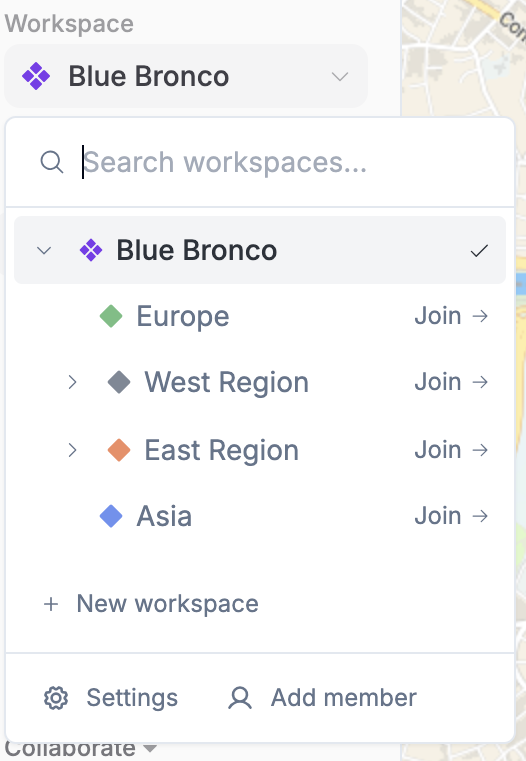
The workspace switcher in the sidebar now lists every workspace you have access to, not just the ones you're a direct member of. Workspaces you have admin access to through a parent role but haven't joined directly show an inline **Join** option. Clicking it adds you as an Admin and switches you into the workspace.
Admins of the active workspace also see three quick-action buttons at the bottom of the dropdown:
* **+ New workspace** — create a sub-workspace with the active workspace as parent
* **Settings** — open Workspace Settings
* **Add member** — invite a teammate or new user directly to the active workspace
#### Consolidated Workspace Settings
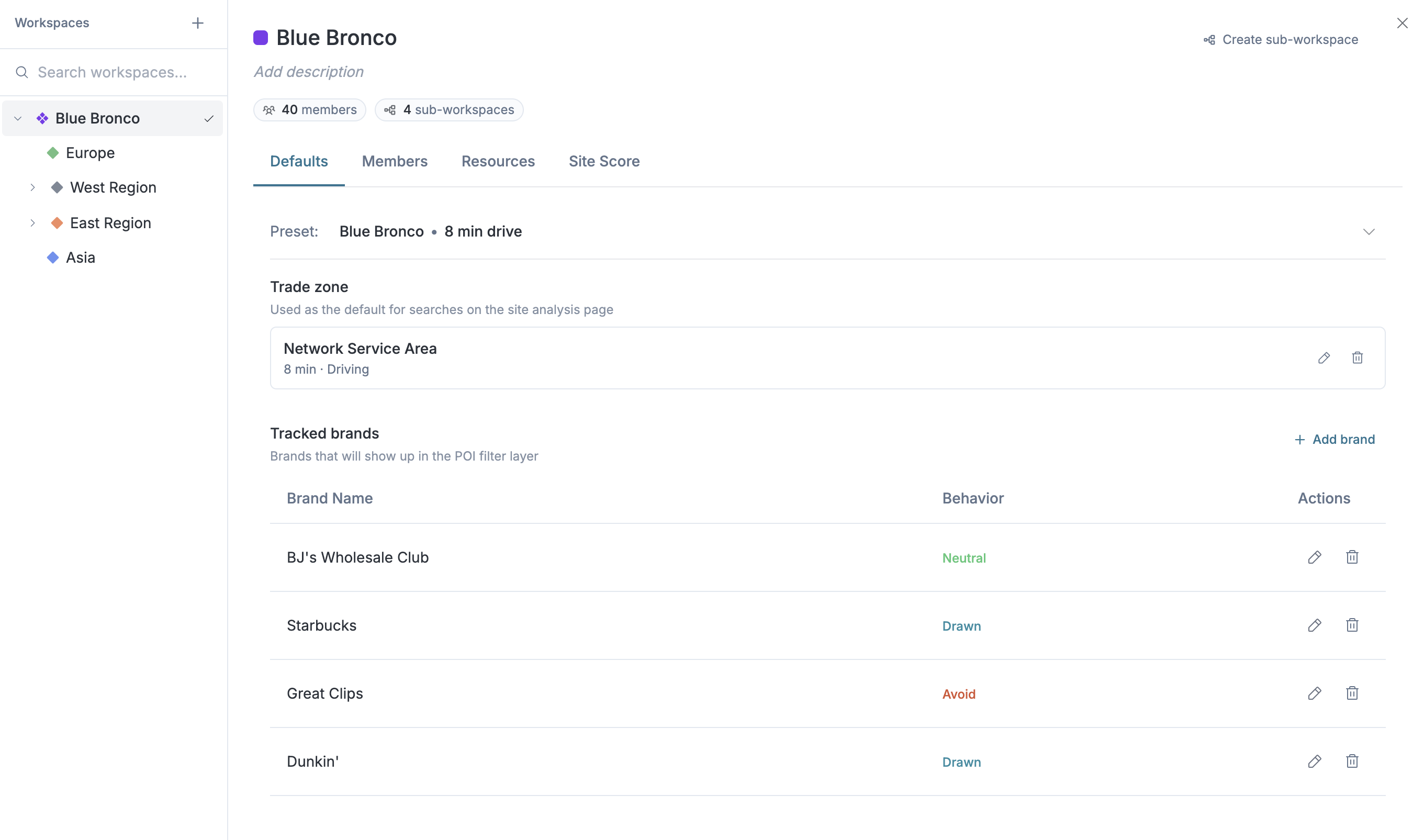
Workspace administration now lives in a single dialog opened from the **Settings** button in the workspace switcher. The left pane is a workspace tree picker, the right pane has four tabs for the selected workspace:
* **Defaults** — preset, trade zone, tracked brands, and tracked categories that drive site analysis
* **Members** — the workspace's roster, with per-workspace Viewer / Member / Admin roles
* **Resources** — bulk-move (or, for custom layers, copy) deals, sites, shared maps, custom layers, files, and tags between workspaces
* **Site Score** — workspace context and lenses for the GrowthFactor Score
Workspace name, color, and description are editable inline at the top of the right pane, and a **+ Create sub-workspace** action is always one click away.
#### Move and Copy Files and Custom Layers Between Workspaces
Files and custom layers can now be transferred between workspaces, both individually (via each card's three-dot menu) and in bulk (from the Resources tab in Workspace Settings). Custom layers are **copied** so the original stays in the source workspace; files, deals, sites, shared maps, and tags are **moved** out of the source.
#### Members and Permissions
A redesigned **Members** page gives admins full control over who can access what. Each member can be assigned a Viewer, Member, or Admin role per workspace, with permissions flowing downward through the tree. The new **Viewer** role provides read-only access for stakeholders who need visibility without editing access.
#### Other Improvements
* **Known Issues** — a new entry in the help menu opens a public list of current platform issues, with statuses and last-updated dates so you can see what we're working on
{% endupdate %}
{% update date="2026-04-15" %}
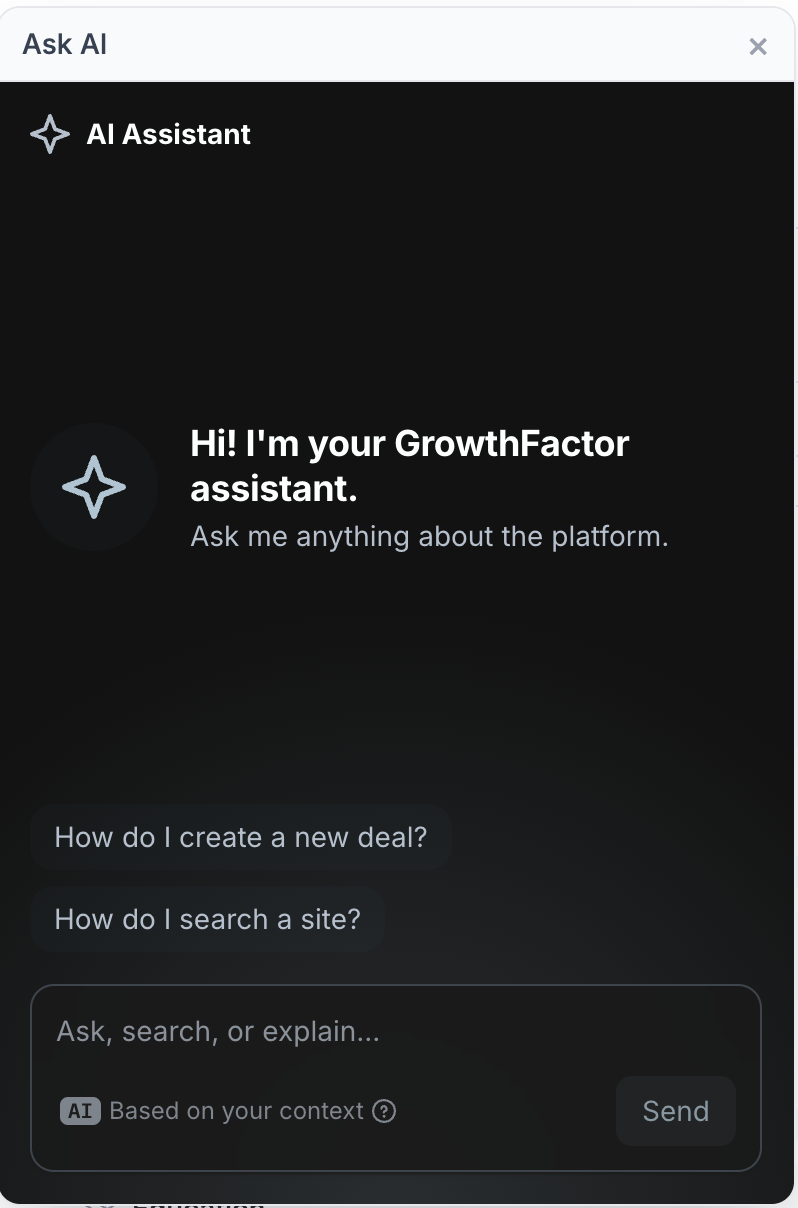
## Ask AI Assistant
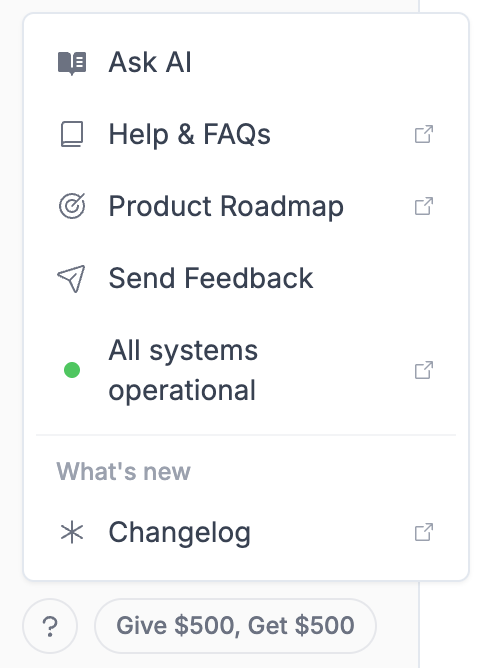
A new **Ask AI** button is now available in the Help menu across all dashboard pages. Click the **?** icon in the sidebar footer, then select **Ask AI** to open an AI-powered assistant that can answer questions about the GrowthFactor platform — without leaving the app.
The assistant comes with suggested questions to get you started, like "How do I create a new deal?" and "How do I search a site?", and can help you navigate features, understand data, and troubleshoot issues in real time.
#### Sites Page
Stores now open on a full dedicated page instead of the previous edit modal. Click any store in **My Stores** to open its detail page with a header, breadcrumb navigation, and four stat cards (Square Footage, Annual Sales, Sales / Sq Ft, and Open Date).
* Inline editing — click any store field to edit it in place with instant save
* Tags — add, remove, and create tags with autocomplete from your org's tag library
* Demographics — for geocoded stores, view trade-area demographics grouped into collapsible categories (Population, Income, Households, Education, and Growth) with top metrics highlighted
* New "Create Store" page — dedicated page with address autocomplete, store detail fields, tags, and a save bar
#### Smoother Org Switching
Switching between organizations is now more reliable:
* Same-org click — clicking the org you're already in no longer triggers a full reload — it shows a quick "Already in \[org name]" instead
* Member names — now update immediately after switching orgs
* Demographics — now always reflects the current org's settings after a switch
* Missing deals — navigating to a deal that doesn't exist in your new org now shows a helpful message instead of a broken page
#### Other Improvements and Fixes
* The Help menu now shows a live colored dot showing whether the platform is operational, degraded, or experiencing downtime
* GrowthFactor Score lenses now display in consistent chronological order instead of random order
* Fixed a bug that could cause GrowthFactor Scores to fail to load intermittently
* Fixed duplicate map layers appearing after navigating between deals
* Creating a store with an invalid address now returns a proper error message instead of failing silently
{% endupdate %}
{% update date="2026-04-08" %}
## Improvements and Bug Fixes
**Percent and Raw Toggle on Demographic Charts**
Demographic bar charts now include a toggle to switch between percent and raw value views, making it easier to compare data in the format most useful to your analysis.
**Vehicle Traffic GrowthFactor Score Lens**
Vehicle traffic data is now available as a GrowthFactor Score lens, giving you an additional dimension for evaluating site potential.
**Referral Button in Sidebar**
A new referral button has been added to the sidebar, making it easy to share GrowthFactor with colleagues and partners.
**Other Fixes**
* GrowthFactor Score lenses and results are now saved correctly on shared maps
* Fixed multi-point cannibalization not correctly including total store cannibalization data
* Fixed shared map creation failing when deal stages were duplicated
* Fixed an error that occurred when clicking "Done" on circle draw without drawing a circle
* Fixed demographic data failing to load in certain configurations
{% endupdate %}
{% update date="2026-04-01" %}
## Temporary Brand and Category Filtering
You can now personalize which brands and categories display on the Tracked POIs layer directly from the map. Click **Edit what's shown** under the Tracked POIs toggle to add or remove specific brands and categories from the display. Click **Apply** to confirm your changes, **Reset** to revert, or **Sync** to match your organization's current settings.
These edits are temporary and scoped to your session — they don't affect other team members or change your organization's permanent settings. For permanent changes, update your organization's presets in Organization Settings.
{% embed url="" %}
#### Other Improvements
**Other Improvements**
**Map Previews on Deal Dashboard**
Deal cards on the Deal Dashboard now display a map preview thumbnail instead of the previous analysis icon. Click the preview to jump directly into the full site analysis map, making it easier to visually identify and navigate to deal locations.
**GF Score Lens Weights and Data Source Configuration**
GrowthFactor Score lenses can now be weighted to reflect what matters most to your concept — if one or two scoring dimensions are more important, their weights can be increased so they contribute more to the overall score. Lens descriptions and data source connections can also be customized per lens. Reach out to the GrowthFactor team at to configure your lenses.
> :rotating\_light: **Known Issue**: The Shared Maps feature currently **re-generates the enhanced GrowthFactor Score** when it is shared. This will be addressed in the next release
**Updated Help Menu**
The help menu has been redesigned with a new icon-based layout in the sidebar, providing quick access to documentation, the product roadmap, feedback, and keyboard shortcuts.
**Other Fixes**
* Decimal radii are now supported for ring-based trade zones (e.g., 1.5 miles, 0.75 miles)
* Analog details modal now displays actual store numbers from your company instead of generic numbering
* Improved toggle interaction for site property fields based on user feedback
* "Save Changes" button on settings pages is now larger and more noticeable
* Hidden Dataplor score from the interface
* GF Score regeneration now properly regenerates all lenses when triggered from the Deal page
* GF Score prompts updated to provide more detailed answers and reasoning
* Tracked Businesses lens now includes distance context for improved analysis quality
* Admin users can now upload PDFs directly to the files page
* Added support for cannibalization in models
* Fixed heatmap layer not appearing on shared maps
* Fixed deal file updates sending incorrect format when modifying existing deals
* Fixed site ID names displaying with a `#` prefix in the analogs list
* Fixed text overflowing the text box during file uploads
* Removed foot traffic sort option from shared maps when foot traffic data is not shared
* Various UI refinements and styling improvements
{% endupdate %}
{% update date="2026-03-24" %}
## GrowthFactor Score Customization
Customize the prompts and data sources for GrowthFactor Score Data to make scores more accurate, helpful, and relevant to your business.
{% endupdate %}
{% update date="2026-03-20" %}
## Category & Name-Based Tracking
Competitive filtering now works by both category and name, across company size. In your settings, you can specify both names to track and categories to track. The UI displays results limited to your selections, with a gated number of categories or brands per account.
{% endupdate %}
{% update date="2026-03-18" %}
## New Full Deal Pages
We have shifted from the deal modal to full dedicated deal pages. Deals now open on their own page instead of a modal overlay.
* Responsive full-page layout with activity sidebar
* Centralized file uploads — single drag-and-drop for all file types, with tagging after upload
* Google Drive-style file cards with thumbnail previews, file info, and in-browser file previews
* Multi-file upload with per-file renaming
{% endupdate %}
{% update date="2026-03-04" %}
## "Local Business" Renamed to "Visitation"
We've renamed the "Local Business" section to "Visitation" across the platform, including in data cards, map popups, and report exports. This better reflects what the section actually covers: foot traffic data and nearby business rankings.
{% endupdate %}
{% update date="2026-03-04" %}
## Separate Share and Export Buttons
We've split the "Share & Export" button into two separate actions — "Share" and "Export" — each with its own dialog.
The Create Shared Map dialog now gives you granular control over what recipients can see. You can toggle visibility for specific data (Forecast, Visitation), individual cards (Analogs, Demographics, Score, etc.), and choose whether to limit the map to a territory boundary. All currently visible layers, including custom data layers, are included automatically.
The Export Report dialog lets you quickly select which sections to include in your print or Excel export without any of the sharing options getting in the way.
{% endupdate %}
{% update date="2026-02-12" %}
## See Existing Store Foot Traffic
Existing store foot traffic and trade zone data can now be viewed with a click for any pin on a map.
{% endupdate %}
{% update date="2026-02-05" %}
## "Open Report" Button for Sited Analysis Map
New "Open Report" button lets you analyze competitors on the Sited Analysis Map. When you click on a business on the map to see its visits, you can now open a report and run a GrowthFactor search on that specific location. This lets you dig into competitor demographics, customer draw, and potential brand cannibalization.
{% endupdate %}
{% update date="2026-02-05" %}
## Edit Deal Names in Deal Dashboard
Deal names can now be customized instead of just showing the address. This makes it easier to identify and manage deals the way you think about them.
{% endupdate %}
{% update date="2026-02-04" %}
## Customizable Forecasting Models with Flexible Feature Selection
You can now have our team use arbitrary site data to forecast anything — from sales, to memberships, to sales of specific retail baskets. Select from multiple forecasting models directly in the platform. Instead of filtering out sites to adjust your forecast, we now create tailored models for your store sets. Note that this means your selected filters will no longer affect your forecasting results.
We've also updated Excel and PDF exports to reflect which model and inputs were used to produce the forecast. Reach out to our team at to build and start using new models!
{% endupdate %}
{% update date="2026-02-04" %}
## Added Button in Sidebar to Product Docs
Added a "Help & FAQs" in the sidebar that links to the product documentation. This documentation explains each feature and how to use them. It also elaborates on best practices, tips, and frequently asked questions.
{% endupdate %}
{% update date="2026-02-04" %}
## Remove Forecasting Card for Users Without the Feature
For organizations that don't have forecasting models, we have hidden the forecasting card. This removes the default data from the site analysis page and report exports, streamlining the user experience.
{% endupdate %}
{% update date="2026-02-04" %}
## Bug Fixes and Minor Changes
**Minor Updates**
* Renamed "Quick Search" page to "Site Analysis"
* Renamed sales PSF on platform to "Forecast Midpoint" to better fit new, more general models
* Brand behavior inputs are now validated, and will error with "Invalid Brand Name" when incorrect slug is used
* Adding a brand behavior now auto-scrolls to the new row
* Deleting presets now requires confirmation, preventing accidental deletions
* Minor spacing and styling adjustments
* "Share" button has been renamed to "Share & Export" in hints and descriptions
* Added labels to "Download Deals" and "Dropbox" buttons on Deal Dashboard
**Bug Fixes**
* Improved foot traffic local totals for competitors/complements
* Fixed a bug where the address column from a CSV upload was ignored if a latitude and longitude were also provided
* Removed the toggle between Sales PSF and Total from sales forecasting — users can still toggle the results by clearing or re-entering the square footage
* Prevented saving brand settings changes while the page is still loading
* Corrected formatting on confirmation popups when optional label or cancel buttons are displayed
{% endupdate %}
{% update date="2026-01-23" %}
## Bug Fixes — Jan 23, 2026
This release resolves several bugs, including issues with foot traffic data, layer visibility, sales reporting, and version updates for the GrowthFactor tool.
* Foot traffic is now yearly
* Share Zoning Layer on Shared Maps
* Preserve layer visibility when you refresh the page
* Fix bug on total sales not showing in analog comparison screen
* Banner to indicate when a new version of GrowthFactor is available
{% endupdate %}
{% update date="2026-01-23" %}
## Scroll Bar Hidden When Not in Use
The scroll bar on the POI data card now disappears when not in use, improving the appearance of screenshots taken of the data card for analysis.
{% endupdate %}
{% update date="2026-01-14" %}
## Maps in PDFs
Improved PDF maps — the ability to include maps in PDFs has been added, improving exports from the platform.
{% endupdate %}
{% update date="2026-01-13" %}
## Users Can Now Persistently Access Their Reports
Users can now persistently access and customize their reports and analyses:
* Re-access the reports and analyses you have done for a site on the Deal Dashboard, allowing you to build upon your previous work
* Attach multiple analyses to each deal, allowing you to do "what ifs" and see how the numbers change if you tweak analysis parameters
{% endupdate %}
{% update date="2026-01-05" %}
## Integrated Data Sources Provide Comprehensive Business Insights
Integrated data sources provide comprehensive business insights by enabling access to a range of Tier 1 data, including customer site metadata, foot traffic, places data, and demographics. This lays the groundwork for incorporating additional data sources into our modeling — including site-specific metadata, foot traffic, and more.
{% endupdate %}
{% update date="2026-01-02" %}
## UI Refresh
Refreshed UI with improved map functionality:
* Easier access to create deals, share, and export
* Larger map view
* Clicking on a tracked business takes you directly to that business
* More demographic data highlights available
* Ability to run analysis by clicking on a map marker
{% endupdate %}
{% update date="2026-01-02" %}
## Remove Non-Logo Logos
Resolved customer feedback that single-letter logos can be confusing, especially when viewed at a distance, by removing non-logo logos.
{% endupdate %}
{% update date="2025-12-04" %}
## Growth Factor Analysis and Recommendations
The GrowthFactor Score feature provides an AI-powered analysis of a business's growth potential, synthesizing recommendations to help optimize their growth strategy based on factors like the surrounding area, market trends, and positioning.
{% endupdate %}
{% update date="2025-12-04" %}
## Deal Dropbox
The new Deal Dropbox allows external parties to quickly submit new sites to retailers. It automatically tags the submitted sites, runs them through the GrowthFactor AI model to generate a score and revenue forecast, and adds the deals to the retailer's dashboard. The Dropbox can also extract data from site flyers, eliminating the need for manual data entry.
{% endupdate %}
{% update date="2025-12-04" %}
## Unlimited File Uploads on Deal Dashboard
The Deal Dashboard now allows for unlimited file uploads, providing users with greater flexibility and storage capacity to manage their deals more effectively.
{% endupdate %}
{% update date="2025-12-04" %}
## Deal Dashboard Print, Export, and Other Minor Improvements
The Print Deal Dashboard has been updated to improve its functionality and user experience. We also enabled the ability to export to Excel, along with some performance improvements.
{% endupdate %}
{% update date="2025-11-17" %}
## Easier Way to Send Feedback
Contact button in the sidebar makes it easy to send us feedback.
{% endupdate %}
{% update date="2025-11-11" %}
## Customizable Shareable Maps
Brokers and franchise developers can now customize the insights they share with prospects, allowing them to highlight the most relevant data that supports their narrative without overwhelming the viewer.
* Toggle on/off key map layers or data panels: Demographics, Psychographics, Foot traffic trends, Vehicle counts, Competitor locations
* Shared version shows only what's selected — clean, focused, and persuasive
{% endupdate %}
{% update date="2025-11-09" %}
## Hide Cannibalization on Shareable Maps
You can now hide cannibalization on shareable maps, along with any other analysis dimension.
{% endupdate %}
{% update date="2025-11-03" %}
## Custom Layer Mapping
Comprehensive custom data layer functionality that enables users to create, edit, combine, and analyze custom geographic boundaries. This unlocks new spatial analysis capabilities for clients, allowing them to define territories that match their business needs and overlay custom data within those boundaries, leading to more informed location decisions.
{% endupdate %}
{% endupdates %}
---
# Agent Instructions
This documentation is published with GitBook. GitBook is the documentation platform designed so that both humans and AI agents can read, navigate, and reason over technical content effectively. Learn more at gitbook.com.
## Querying This Documentation
If you need additional information that is not directly available in this page, you can query the documentation dynamically by asking a question.
Perform an HTTP GET request on the current page URL with the `ask` query parameter, and the optional `goal` query parameter:
```
GET https://docs.growthfactor.ai/changelog/readme.md?ask=&goal=
```
`ask` is the immediate question: it should be specific, self-contained, and written in natural language.
`goal` is optional and describes the broader end goal you are ultimately trying to accomplish on behalf of the user. GitBook uses it to tailor the answer towards what is most useful for that goal.
The response will contain a direct answer to the question and relevant excerpts and sources from the documentation.
Use this mechanism when the answer is not explicitly present in the current page, you need clarification or additional context, or you want to retrieve related documentation sections.